

Core Architecture
The end-to-end payment flow follows an asynchronous request-and-notify architecture: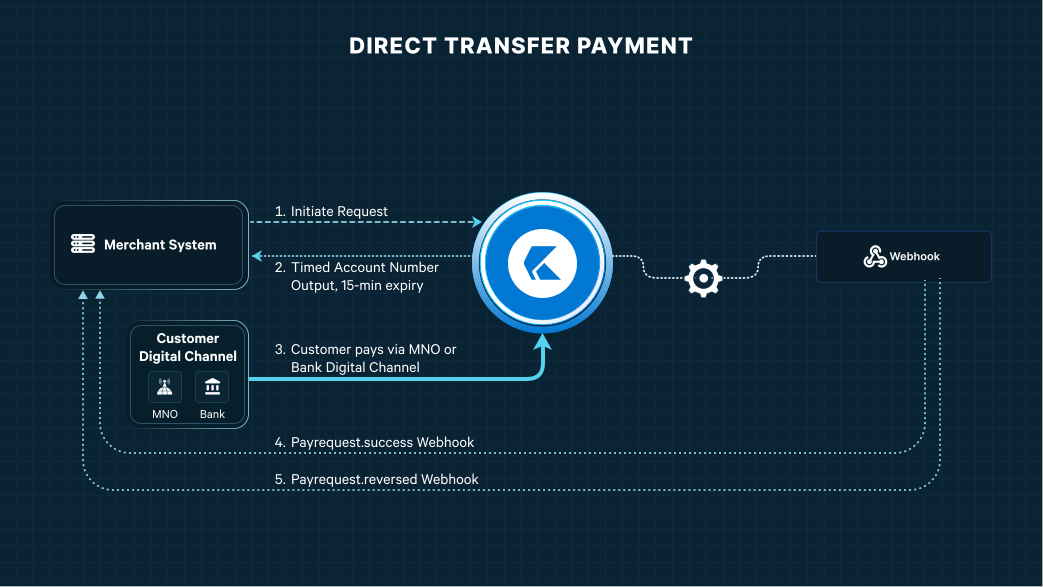
1
Step 1: Initiate Payment Request
Initiate payments directly from your backend system via the Direct Transfer API, or through your OneKhusa hosted checkout service.
2
Step 2: Handle Initiation Response
Upon receiving the payment request, OneKhusa generates a temporary account number (TAN) assigned to the transaction.
Important Expiration Notice: The timed account number is valid strictly for 15 minutes from generation. Present this number to the customer immediately with an active timer.
3
Step 3: Customer Payment Execution
The customer completes payment via their preferred digital banking app or Mobile Network Operator (MNO) USSD/App interface by transferring funds to the provided timed-account-number. Usually, OneKhusa payment option is available under Banks or Wallets service within the digital channel.
4
Step 4: Process Successful Payment (payrequest.success)
When OneKhusa receives and matches the customer’s funds transfer payment, a
payrequest.success webhook notification is dispatched to your registered callback url.5
Step 5: Process Payment Reversals (payrequest.reversed)
If a completed transaction is reversed due to MNO network correction, administrative adjustment, or customer dispute resolution, OneKhusa sends a
payrequest.reversed reversal webhook notification to your registered callback url.Required Action: Your system must automatically reverse account credits, revoke digital fulfillment, and log the adjustment in your account upon receiving this event.
Implementation Best Practices
-
Payment Simulation: In sandbox environment, to test the receiving of funds transfer payment from the customer to trigger the webhook event,
payrequest.success, use thisSimulate Accept Direct Transfer Paymentendpoint. -
Idempotency Handling: Ensure your webhook callback url checks
transactionReferenceNumberbefore processing to safely ignore duplicate webhook notification transmissions. - Signature Verification: Verify the HMAC signature header on incoming webhooks to ensure payloads originate securely from OneKhusa.
- UI/UX Countdown: Display an active 15-minute countdown clock on the payment screen to reduce customer drop-off and expired transaction attempts.