

Request To Pay Checkout
The Request to Pay Checkout is a managed OneKhusa service that simplifies the checkout process for accepting payments to be made by third party systems supported by request-to-pay feature. In order to accept payments through the managed checkout page, the process is as follows:
- Your system initiates a checkout payment request
- On successful payment request, redirect to the hosted checkout page
- Finalise the payment through bank account or mobile wallet
- Update the payment status in your system through webhook notification
- The checkout service redirects to your system to mark the process as successful
Let’s implement the checkout flow to start accepting payments from your customers:
1. Initiate Payment Request
This step allows your application initiates the payment request and waits for the successful response to redirect to OneKhusa hosted checkout service.
2. Redirect To Checkout
Once your application receives a successfully initiated payment response, redirect it to the OneKhusa checkout page using the URL generated under the checkoutUrl property.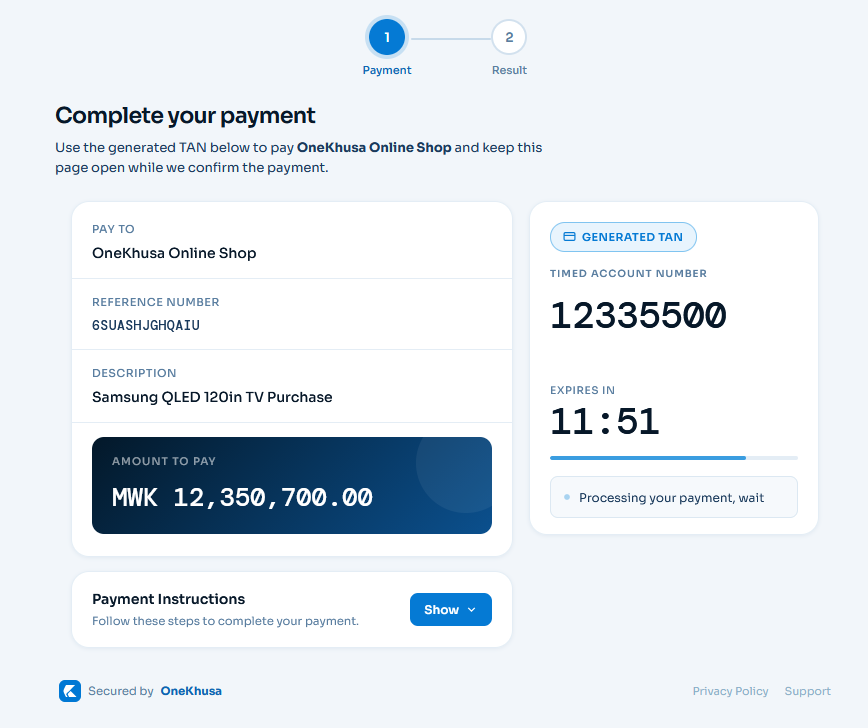 Figure 1: Request To Pay Checkout
Your initiated payment transaction will be displayed as illustrated in figure 1 above and follow the instructions to pay through the supported banks and mobile money wallets on OneKhusa. Once payment is successful and received, you will be redirected automatically to your application.
Figure 1: Request To Pay Checkout
Your initiated payment transaction will be displayed as illustrated in figure 1 above and follow the instructions to pay through the supported banks and mobile money wallets on OneKhusa. Once payment is successful and received, you will be redirected automatically to your application.
3. Simulate Checkout Payment
To simulate a payment made by a customer through managed checkout service, do either one of the following:- Login to merchant portal, navigate to Fake Data – Simulate Accept Request To Pay, then provide details from the checkout (TAN and Amount) and finalise the payment OR
- Use Simulate Accept Request To Pay endpoint
Authorizations
Bearer authentication header of the form Bearer Token, Where accessToken is the access token used to authenticate the request.
Headers
A unique key to ensure idempotent requests
Body
Response
Successful initiation of checkout request
Unique reference number provided in the request.
"SRN123456789"
Merchant account used for the transaction.
12345678
Generated transaction ID used for redirecting to checkout.
"GENERATED_TRANSACTION_ID"
Generated hosted checkout URL used to redirect the customer to the payment page.
"GENERATED_CHECKOUT_URL"