

client.Transactions.SingleDisbursements.
Key Business Use Cases
- External Payouts: Automated payout processing to customer bank accounts or mobile money wallets through payment connectors (e.g., payroll, vendor payments, platform withdrawals).
- Internal Payouts: Real-time account balance reallocation between sub-merchants or departments within the same organisation.
- B2B Transfers: Direct merchant-to-merchant payouts across different organisations operating on OneKhusa.
Supported Transfer Types
OneKhusa categorizes single disbursements into three distinct transfer channels based on the target beneficiary destination:How Single Disbursements Work (Execution Flow)
-
Configure the client: Instantiate
OneKhusaClientwith your API key, API secret,MerchantAccountNumberandOrganisationId. -
Initiate Transfer: Call the appropriate method (
CreatePayoutAsyncfor external,CreateIntraTransferAsyncfor intra-organisation,CreateInterTransferAsyncfor inter-organisation) supplying the source merchant account, amount, and beneficiary details matching the transfer route. -
Processing & Status:
- Intra- and Inter-Organisation transfers execute synchronously with immediate balance updates on the internal ledger.
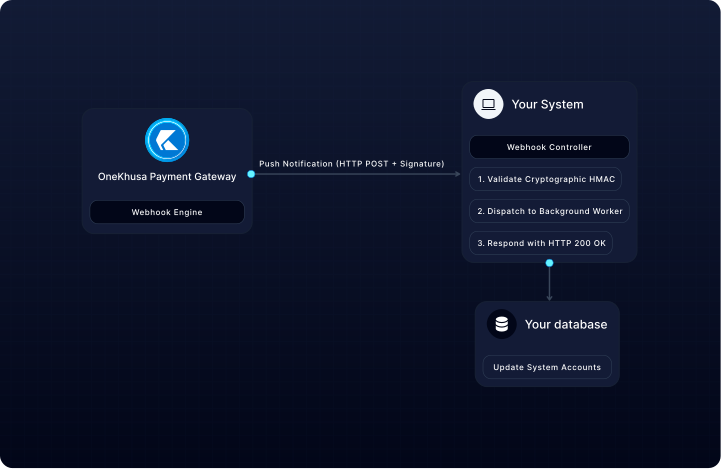
- External transfers to banks or mobile money networks process asynchronously via payment connectors, updating status asynchronously via webhooks.
- Approval Workflow: Depending on your organisation’s authorisation policy (2-eye, 4-eye or 6-eye), posted transfers are approved and, where required, reviewed before execution.
SDK Method and Namespace Reference
Transaction inquiry is shared across all channels: use
GetPayoutsAsync and GetPayoutAsync (Shared) to query posted payouts.
Developer Best Practices & Operational Safeguards
-
Idempotency Keys: Always supply a unique
idempotency-keyfor disbursement requests to prevent duplicate payouts caused by transient network timeouts. The SDK generates one automatically if you do not provide it. -
Account Balance Checks: Ensure the merchant account maintains sufficient cleared (available) funds prior to initiating disbursements; overdraft transfers will be rejected automatically (
400 Insufficient funds). -
Webhook Handling: Implement webhook listeners to receive final execution states (
SUCCESS,FAILED,REVERSED) for external payouts.